Session Spawning & Git Collaboration
Two features that work as a pair: spawning subtasks into independent child sessions with
vspawn(optionally in isolated git worktrees), and a graphical merge to bring parallel branches back together. Together they make "several agents working the same repo in parallel" an everyday workflow.
1. What spawning is
From inside any session, split a subtask off: VelaTerm creates a new child session under the current node (the tree becomes hierarchical: parent → child → grandchild), optionally gives it an isolated git worktree, and feeds the task description in as the new session's first message — the new agent starts working the moment it boots, no re-explaining needed.
What you get is a real session in the tree — its own process, fully interactive, resumable — that you can watch or step into at any time. It is not a hidden background task.
2. Four entry points
| Entry | Who uses it | Worktree |
|---|---|---|
Terminal command vspawn "task" | You, in any session | Off by default; --worktree enables |
Terminal command vspawn-tree "task" | Same | Always on |
/vspawn task in a claude conversation | Claude spawns it (and expands the task into a rich self-contained prompt) | Off by default |
/vspawn-tree task in a claude conversation | Same | Always on |
The two terminal commands are injected into every session's PATH automatically — zero install.
Prerequisite for the
/skills: before claude can use/vspawnor/vspawn-tree(or spawn sub-sessions on its own initiative), enable Vela Skills in Settings ▸ General. This installs the/vspawn,/vspawn-tree, and/vopenskills as a bundle into~/.claude/skills/; they're kept up to date automatically on app upgrades. After enabling, start a new claude session (or restart an existing one) so the agent picks the skills up. Without this, claude simply doesn't know these commands — only the terminal-typedvspawn/vspawn-treework.
3. Confirm before spawn
By default every spawn first shows a confirmation card (top-right, non-modal, doesn't steal focus):
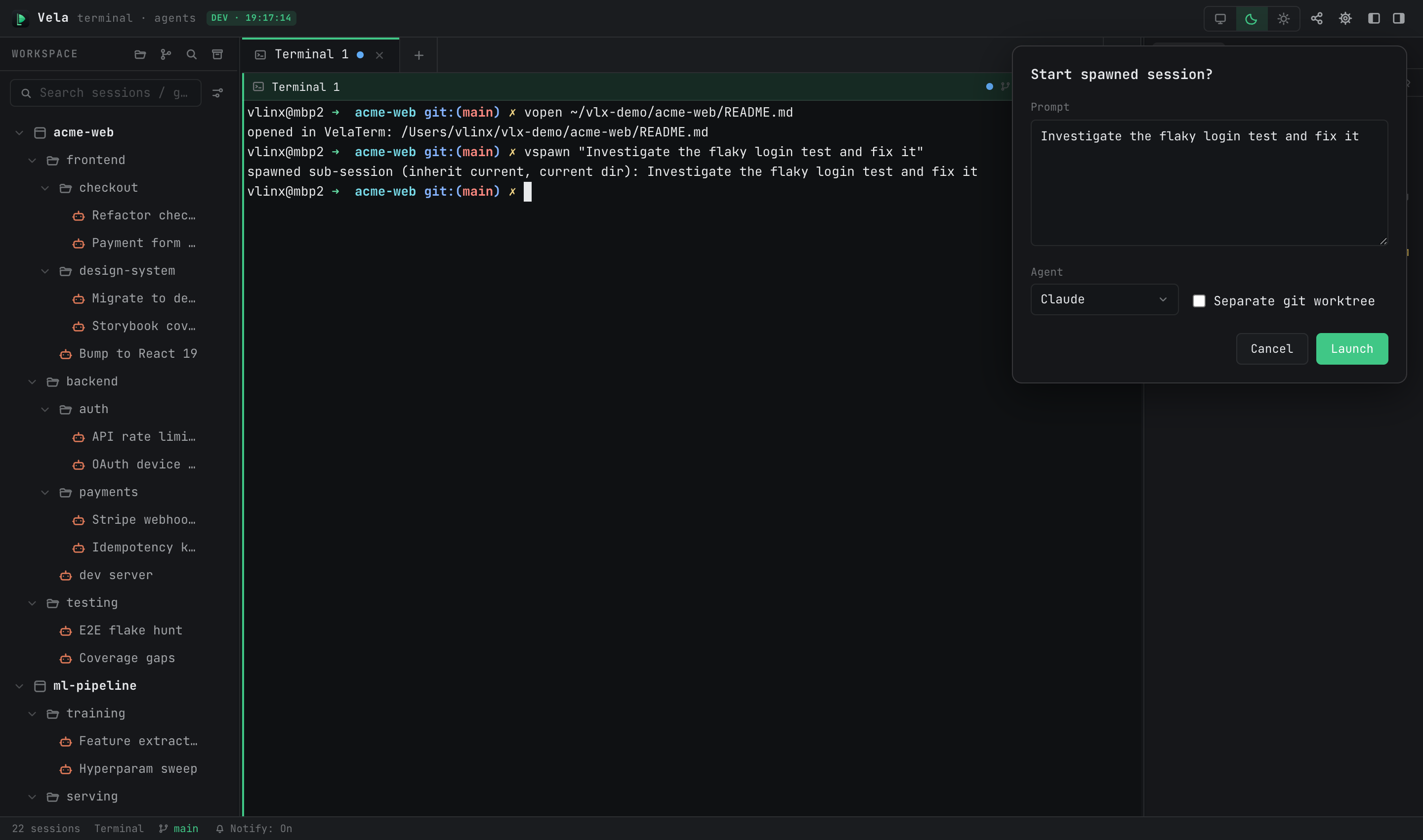
- Three editable fields: the prompt (multi-line), the agent type (defaults to the parent's), and separate git worktree.
- "Launch" starts the child session; "Cancel" drops the request. When an agent spawns several at once, cards are handled one at a time (the remaining count shows on the card).
- If you'd rather skip confirmation entirely, turn off "Confirm before spawn" in Settings ▸ Behavior.
4. Worktrees: parallel without stepping on each other
With the worktree option on, the child session works on a new branch in its own working directory — isolated from the main workspace and from other children. That's the right shape for multi-agent parallelism. Management lives in the session context menu under "Worktree ▸": view changes, copy / open the worktree folder, delete the worktree (with optional force to discard uncommitted changes).
Spawning from a non-git directory still works; it just falls back to sharing the parent's directory, with no worktree.
5. Merge: graphical Git merge
When the work is done, bring it home. Any session whose working directory is a git repo (worktree or not): right-click → "Git ▸ Merge…" opens the merge dialog:
- You pick both source and target branches, and can swap direction — merge a child's branch back into main, or pull main into the child to refresh its baseline, all from the same dialog.
- The merge executes in the working tree where the target branch is checked out; if the source tree has uncommitted changes, they're committed first so nothing is lost.
- On conflict, the scene is left in place for you (or an agent) to resolve in the terminal and continue.
Merging does not auto-delete the worktree — clean it up afterwards via "Worktree ▸ Delete worktree…" once you're sure.
6. A typical workflow
- In the main session, have claude analyze the task, then
/vspawn-tree refactor the checkout moduleto spawn it (requires Vela Skills — see §2). - Review the prompt on the confirmation card and hit Launch — the child starts in its own worktree, visible in the sidebar under its parent, dot turning green.
- You keep working in the main session; when the child asks something or finishes, its dot turns yellow and a notification fires.
- Step in to review, then right-click → "Git ▸ Merge…" to merge its branch back into main.
- "Worktree ▸ Delete worktree…" to clean up, then archive the child session for the record.